Kubernetes is an open-source system for automating deployment, scaling, and management of containerized applications.
Kubernetes was started by Google and, with its v1.0 release in July 2015, Google donated it to the
Cloud Native Computing Foundation
(CNCF).
Container Orchestration
Container Orchestrators are the tools which group hosts together to form a cluster, and help us fulfill the next requirements
-
Are fault-tolerant
-
Can scale, and do this on-demand
-
Use resources optimally
-
Can discover other applications automatically, and communicate with each other
-
Are accessible from the external world
-
Can update/rollback without any downtime.
Nowadays, there are many Container Orchestrators available, such as:
Where to Deploy ContainerOrchestrators?
it can be deployed on the environment of our choice, be it VMs, bare-metal, or public/private/hybrid/multi-cloud setups.
For example, Kubernetes can be deployed inside a company's datacenter, on AWS, on OpenStack, etc.
There are even one-click installers available to setup Kubernetes on the Cloud, like Google Container Engine on Google Cloud, or Azure Container Service on Microsoft Azure.
Kubernetes can be installed on on-premise Bare Metal, on topofdifferent Operating Systems, like RHEL, CoreOS, CentOS, Fedora, Ubuntu, etc.
The Master Node is responsible for managing theKubernetes cluster, and it is the entry point for all administrative tasks. We can communicate to the Master Node via the CLI, the GUI (Dashboard), or via APIs.
For fault tolerance purposes, there can be more than one Master Node in the cluster. If we have more than one Master Node, they would be in a HA (High Availability) mode, and only one of them will be the leader, performing all the operations. The rest of the Master Nodes would be followers.
To manage the cluster state, Kubernetes uses
etcd
, and all Master Nodes connect to it.
etcd
is a distributed key-value store, which we will discuss in a little bit. The key-value store can be part of the Master Node. It can also be configured externally, in which case, the Master Nodes would connect to it.
A Master Node has the following components:
-
API Server
All the administrative tasks are performed via the API Server within the Master Node. A user/operator sends REST commands to the API Server, which then validates and processes the requests. After executing the requests, the resulting state of the cluster is stored in the distributed key-value store.
-
Scheduler
As the name suggests, the Scheduler schedules the work to different Worker Nodes. The Scheduler has the resource usage information for each Worker Node. It also knows about the constraints that users/operators may have set, such as scheduling work on a node that has the label
disk==ssd
set. Before scheduling the work, the Scheduler also takes into account the quality of the service requirements, data locality, affinity, anti-affinity, etc. The Scheduler schedules the work in terms of Pods and Services.
-
Controller Manager
The Controller Manager manages different non-terminating control loops, which regulate the state of the Kubernetes cluster. Each one of these control loops knows about the desired state of the objects it manages, and watches their current state through the API Server. In a control loop, if the current state of the objects it manages does not meet the desired state, then the control loop takes corrective steps to make sure that the current state is the same as the desired state.
-
etcd
As discussed earlier,
etcd
is a distributed key-value store which is used to store the cluster state. It can be part of the Kubernetes Master, or, it can be configured externally, in which case, Master Nodes would connect to it.
Worker Node is a machine (VM, physical server, etc.) which runs the applications using Pods and is controlled by the Master Node. Pods are scheduled on the Worker Nodes, which have the necessary tools to run and connect them. A Pod is the scheduling unit in Kubernetes. It is a logical collection of one or more containers which are always scheduled together.
WorkerNodeComponents
-
Container Runtime
To run containers, we need a Container Runtime on the Worker Node. By default, Kubernetes is configured to run containers with
Docker
. It can also run containers using the
rkt
Container Runtime.
-
kubelet
The kubelet is an agent which runs on eachWorker Node and communicates with the Master Node. It receives the Pod definition via various means (primarily, through the API Server), and runs the containers associated with the Pod. It also makes sure the containers which are part of the Pods are healthy at all times.
The kubelet connects with the Container Runtimes to run containers. Currently, the kubelet and Container Runtimes are tightly coupled. There is work in progress for the
Container Runtime Interface
(CRI) to have a pluggable CRI in the near future.
-
kube-proxy
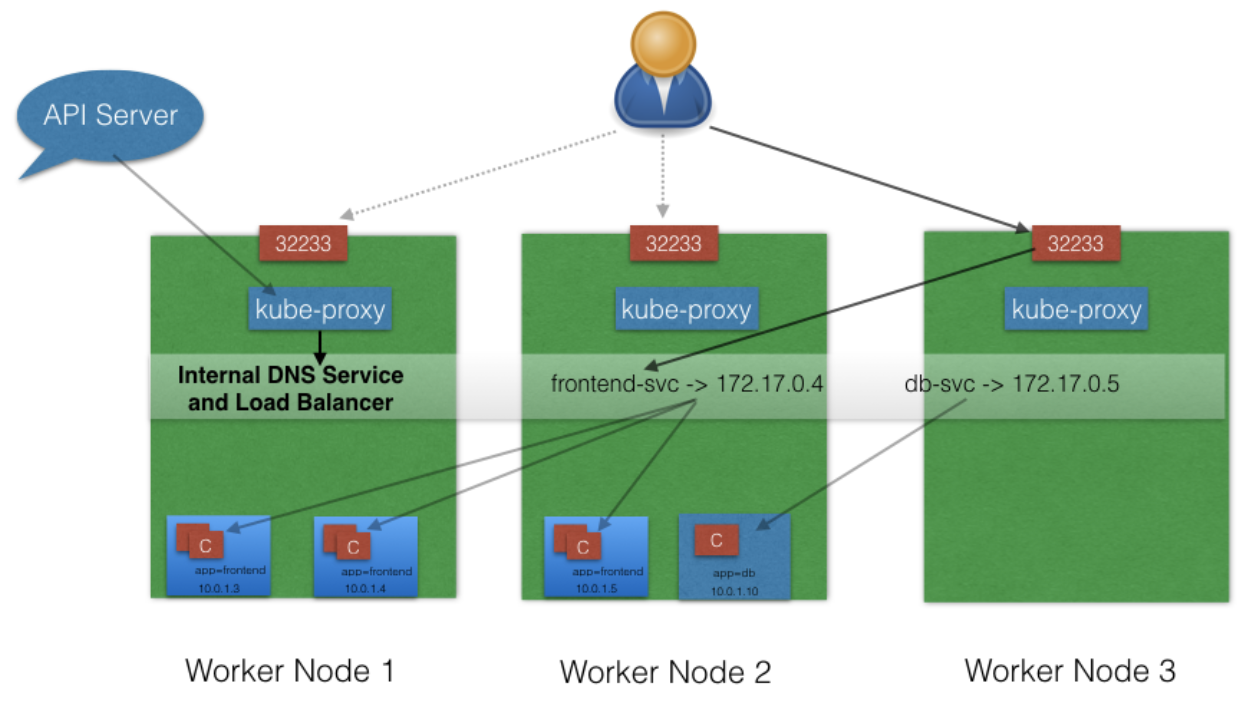
Instead of connecting directly to Pods to access the applications, we use a logical construct called a Service as a connection endpoint. A Service groups related Pods, which it load balances when accessed. We will talk more about Services in later chapters.
kube-proxy
is the network proxy which runs on each Worker Node and listens to the API Server for each Service endpoint creation/deletion. For each Service endpoint,
kube-proxy
sets up the routes so that it can reach to it.
State Management with etcd
Kubernetes uses
etcd
to store the cluster state.
etcd
is a distributed key-value store based on the
Raft Consensus Algorithm
. Raft allows a collection of machines to work as a coherent group that can survive the failures of some of its members. At any given time, one of the nodes in the group will be the Master, and the rest of them will be the Followers. Any node can be treated as a Master.
etcd
is written in the Go programming language. In Kubernetes, besides storing the cluster state,
etcd
is also used to store configuration details such as subnets, ConfigMaps, Secrets, etc.
To have a fully functional Kubernetes cluster, we need to make sure of the following:
-
A unique IP is assigned to each Pod
-
Containers in a Pod can communicate to each other
-
The Pod is able to communicate with other Pods in the cluster
-
If configured, the application deployed inside a Pod is accessible from the external world.
In Kubernetes, each Pod gets a unique IP address. For container networking, there are two primary specifications:
-
Container Network Model (CNM), proposed by Docker
-
Container Network Interface (CNI), proposed by CoreOS.
Kubernetes uses CNI to assign the IP address to each Pod.
The Container Runtime offloads the IP assignment to CNI, which connects to the underlying configured plugin, like Bridge or MACvlan, to get the IP address. Once the IP address is given by the respective plugin, CNI forwards it back to the requested Container Runtime.
Container-to-Container Communication Inside a Pod
With the help of the underlying Host OS,all of the Container Runtimes generally create an isolated network entity for each container that it starts. On Linux, that entity is referred toas a Network Namespace. These Network Namespaces can be shared across containers, or with the Host Operating System.
Inside a Pod, containers share the Network Namespaces, so that they can reach to each other via localhost.
Pod-to-Pod Communication A cross Nodes
In a clustered environment, the Pods can be scheduled on any node. We need to make sure that the Pods can communicate across the nodes, and all the nodes should be able to reach any Pod. Kubernetes also puts a condition that there shouldn't be any Network Address Translation (NAT) while doing the Pod-to-Pod communication across Hosts. We can achieve this via:
-
Routable Pods and nodes, using the underlying physical infrastructure, like Google Container Engine
-
Using Software Defined Networking, like
Flannel
,
Weave
,
Calico
, etc.
Communication Between the External World and Pods
By exposing our services to the external world with
kube-proxy
, we can access our applications from outside the cluster.
Kubernetes Configuration
Kubernetes can be installed using different configurations. The four major installation types are briefly presented below:
-
All-in-One Single-Node Installation
With All-in-One, all the Master and Worker components are installed on a single node. This is very useful for learning, development, and testing. This type should not be used in production. Minikube is one such example, and we are going to explore it in future chapters.
-
Single-Node etcd, Single-Master, and Multi-Worker Installation
In this setup, we will have a single Master Node, which will also run a single-node
etcd
instance. Multiple Worker Nodes are connected to the Master Node.
-
Single-Node etcd, Multi-Master, and Multi-Worker Installation
In this setup, we will have multiple Master Nodes, which will work in HA mode, but we will have a single-node
etcd
instance. Multiple Worker Nodes are connected to the Master Nodes.
-
Multi-Node etcd, Multi-Master, and Multi-Worker Installation
In this mode,
etcd
is configured in a clustered mode, outside the Kubernetes cluster, and the Nodes connect to it. The Master Nodes are all configured in an HA mode, connecting to multiple Worker Nodes. This is the most advanced and recommended production setup.
Cloud Ready for Kubernetes
Some vendors providing Hosted Solutions for Kubernetes, like:
Kubernetes InstallationTools/Resources
-
kubeadm
kubeadm
is a first-class citizen on the Kubernetes ecosystem. It is a secure and recommended way to bootstrap the Kubernetes cluster. It has a set of building blocks to setup the cluster, but it is easily extendable to add more functionality. Please note that
kubeadm
does not support the provisioning of machines.
-
Kubespray
With
Kubespray
(formerly known as Kargo), we can install Highly Available Kubernetes clusters on AWS, GCE, Azure, OpenStack, or Bare Metal. Kubespray is based onAnsible, and is available on most Linux distributions. It is a
Kubernetes Incubator
project.
-
Kops
With
Kops
, we can create, destroy, upgrade, and maintain production-grade, highly-available Kubernetes clusters from the command line. It can provision the machines as well. Currently, AWS is officially supported. Support for GCE and VMware vSphere are in alpha stage, and other platforms are planned for the future.
Localhost Installation
There are a few localhost installation options available to deploy single- or multi-node Kubernetes clusters on our workstation/laptop:
Minikube is the preferred and recommended way to create an all-in-one Kubernetes setup.