Showing posts with label Solr. Show all posts

Wednesday, November 4, 2020

Setup Solr 9.5 on Ubuntu

Solr installation comands

sudo add-apt-repository ppa:linuxuprising/java

sudo apt-get update

apt-get install openjdk-11-jdk -y

wget https://dlcdn.apache.org/solr/solr/9.5.0/solr-9.5.0.tgz

tar xzf solr-9.5.0.tgz solr-9.5.0/bin/install_solr_service.sh --strip-components=2

sudo bash ./install_solr_service.sh solr-9.5.0.tgz


http://127.0.0.1:8983/solr/#/

Create New core to host data inside it
sudo su - solr -c "/opt/solr/bin/solr create -c core_catalog_metadata_v2 -n data_driven_schema_configs"

Define Core Schema
Add your Fields schema inside managed-schema file found in path
/var/solr/data/core_catalog_metadata_v2/conf


Sample of fields that we can add

  <field name="status_id" type="pint" docValues="true" indexed="true" stored="false" />
  <field name="description" type="text_general" multiValued="false" indexed="false" stored="true"/>
  <field name="Comments" type="text_ar" indexed="true" stored="false" omitNorms="true" />
  

Define new Datatype that support Arabic
  <field name="FullName" type="text_ar_sort" multiValued="false" docValues="true" indexed="true" stored="true"/>

  
  <fieldType name="text_ar_sort" class="solr.SortableTextField" sortMissingLast="true" docValues="true"  positionIncrementGap="100" multiValued="false">
    <analyzer type="index">
      <tokenizer class="solr.StandardTokenizerFactory"/>
      <filter class="solr.StopFilterFactory" words="lang/stopwords_ar.txt" ignoreCase="true"/>
  <filter class="solr.ArabicNormalizationFilterFactory"/>
      <filter class="solr.ArabicStemFilterFactory"/>
      <filter class="solr.LowerCaseFilterFactory"/>
    </analyzer>
    <analyzer type="query">
      <tokenizer class="solr.StandardTokenizerFactory"/>
      <filter class="solr.StopFilterFactory" words="lang/stopwords_ar.txt" ignoreCase="true"/>
  <filter class="solr.ArabicNormalizationFilterFactory"/>
      <filter class="solr.ArabicStemFilterFactory"/>
      <filter class="solr.SynonymGraphFilterFactory" expand="true" ignoreCase="true" synonyms="synonyms.txt"/>
      <filter class="solr.LowerCaseFilterFactory"/>
    </analyzer>
  </fieldType>


Solr Security

by default solr will listen to local calls only, to allow access:
nano /etc/default/solr.in.sh

listen to 0.0.0.0


Restrict network access to specific hosts, by activate Ubuntu firewall

sudo ufw enable
sudo ufw default deny incoming
sudo ufw allow OpenSSH
reboot

Add white list IPs that can access Solr

for ip in 193.199.247.17 193.42.243.96 193.35.34.22 193.59.15.7 193.89.167.125 193.59.21.206 193.189.32.185; 
do   
sudo ufw allow proto tcp from $ip to any port 8983 comment "Allow access to port 8983 from $ip"; 
done

View Firewall Status
sudo ufw status verbose

Allow new IP to access Solr
sudo ufw allow proto tcp from 193.35.116.116 to any port 8983 comment "Allow access to port 8983 from 193.35.116.116"

Monday, November 4, 2019

Install Solr 8.2 based on Java 11


sudo apt install -y default-jdk


wget http://www-eu.apache.org/dist/lucene/solr/8.2.0/solr-8.2.0.tgz

tar xzf solr-8.2.0.tgz solr-8.2.0/bin/install_solr_service.sh --strip-components=2

sudo bash ./install_solr_service.sh solr-8.2.0.tgz

Now the Solr RUN on your Server, and you can check it using 

http://127.0.0.1:8983/solr/#/


Start, Stop and check the status of Solr service

sudo systemctl stop solr
sudo systemctl start solr
sudo systemctl status solr

To create new Search Core

sudo su - solr -c "/opt/solr/bin/solr create -c mycol1 -n data_driven_schema_configs"

Monday, October 14, 2019

Solr Field Attributes

Compare querying in Solr with querying in SQL databases, the mapping is as follows.

SQL query: 
select album,title,artist
 from hellosolr
 where album in ["solr","search","engine"] order by album DESC limit 20,10;

Solr query: 
$ curl http://localhost:8983/solr/hellosolr/select?q=solr search engine &fl=album,title,artist&start=20&rows=10&sort=album desc


If you want to search a field for multiple tokens, you need to surround it with parentheses:
  q=title:(to kill a mockingbird)&df=album
  q=title:(buffalo OR soldier) OR artist:(bob OR marley)


Query Operators 

The following are operators supported by query parsers:

OR: Union is performed and a document will match if any of the clause is satisfied.
AND: Association is performed and a document will match only if both the clauses are satisfied.
NOT: Operator to exclude documents containing the clause.
+/-: Operators to mandate the occurrence of terms. + ensures that documents containing the token must exist, and - ensures that documents containing the token must not exist.

Phrase Query  ""

exact search
   q="bob marley"

Proximity Query  ~ INT

A proximity query requires the phrase query to be followed by the tilde (~) operator and a numeric distance for identifying the terms in proximity.
  q="jamaican singer"~3

Wildcard Query ? *

You can specify the wildcard character ?, which matches exactly one character, or *, which matches zero or more characters.

   q=title:(bob* OR mar?ey) OR album:(*bird)    


Range Query [] {}

q=price:[1000 TO 5000]         // 1000 <= price <= 5000
q=price:{1000 TO 5000}       // 1000 < price > 5000
q=price:[1000 TO 5000}       // 1000 <= price > 5000
q=price:[1000 TO *]             // 1000 <= price


Check if field exists or not exists 
for field exists 

field:[* TO *]

for field not exists
q=*:* -Tag_100_is:[* TO *]
 

Filter Query fq

Before apply any search filter all documents and select only the documents that has language=english and genre=rock
 If multiple fq parameters are specified, the query parser will select the subset of documents that matches all the fq queries.

  q=singer(bob marley) title:(redemption song)&fq=language:english&fq=genre:rock   

q=product:hotel&fq=city:"las vegas" AND category:travel

rows=   &   start= 

use start and rows together to get paginated search results.

sort
 comma-separated list of fields on which the result should be sorted. The field name should be followed by the asc or desc keyword
    sort=score desc,popularity desc  


fl 
Specifies the comma-separated list of fields to be displayed in the response.

wt
Specifies the format in which the response should be returned, such as JSON, XML, or CSV.

debugQuery 
This Boolean parameter works wonders to analyze how the query is parsed and how a document got its score. Debug operations are costly and should not be enabled on live production queries. This parameter supports only XML and JSON response format currently.

explainOther
explainOther is quite useful for analyzing documents that are not part of a debug explanation. debugQuery explains the score of documents that are part of the result set (if you specify rows=10, debugQuery will add an explanation for only those 10 documents). If you want an explanation for additional documents, you can specify a Lucene query in the explainOther parameter for identifying those additional documents. Remember, the explainOther query will select the additional document to explain, but the explanation will be with respect to the main query.


Solr Schema save inside "managed-schema" file


Sample File Content

<schema name="default-config" version="1.6">
    <field name="id" type="string" indexed="true" stored="true" required="true" multiValued="false" />
    <field name="_version_" type="plong" indexed="false" stored="false"/>
    <field name="_root_" type="string" indexed="true" stored="false" docValues="false" />
    <field name="_text_" type="text_general" indexed="true" stored="false" multiValued="true"/>
</schema>


Explain Solr Field Attributes

name : each field should has a name
type : each field should has a type
indexed: whether it will be searchable or not
stored : whether it will be visible and user get field value or not
multiValued: where if the value is a single value or array of values
default: set default value if field is missing
sortMissingLast: order missing at the end
sortMissingFirst: order missing at the begin
required: Setting this attribute as true specifies a field as mandatory.

docValues: true means create a forward index for the field. Notes: inverted index is not efficient for sorting, faceting, and highlighting, and this approach promises to make it faster and also free up the fieldCache.

omitNorms Fields have norms associated with them, which holds additional information such as index-time boost and length normalization. Specifying omitNorms="true" discards this information, saving some memory. Length normalization allows Solr to give lower weight to longer fields. If a length norm is not important in your ranking algorithm (such as metadata fields) and you are not providing an index-time boost, you can set omitNorms="true". By default, Solr disables norms for primitive fields.


The following are possible combinations of indexed and stored parameters: 
indexed="true" & stored="true": 
When you are interested in both querying and displaying the value of a field.

indexed="true" & stored="false": 
When you want to query on a field but don’t need its value to be displayed. For example, you may want to only query on the extracted metadata but display the source field from which it was extracted.

indexed="false" & stored="true": 
If you are never going to query on a field and only display its value.


Define New Solr Type that support Arabic

  <field name="subjects" type="text_ar_sort" indexed="true" stored="true"/>

Define new type "text_ar_sort"

  <fieldType name="text_ar_sort" class="solr.SortableTextField" sortMissingLast="true" docValues="true"  positionIncrementGap="100" multiValued="false">
    <analyzer type="index">
      <tokenizer class="solr.StandardTokenizerFactory"/>
      <filter class="solr.StopFilterFactory" words="lang/stopwords_ar.txt" ignoreCase="true"/>
  <filter class="solr.ArabicNormalizationFilterFactory"/>
      <filter class="solr.ArabicStemFilterFactory"/>
      <filter class="solr.LowerCaseFilterFactory"/>
    </analyzer>
    <analyzer type="query">
      <tokenizer class="solr.StandardTokenizerFactory"/>
      <filter class="solr.StopFilterFactory" words="lang/stopwords_ar.txt" ignoreCase="true"/>
  <filter class="solr.ArabicNormalizationFilterFactory"/>
      <filter class="solr.ArabicStemFilterFactory"/>
      <filter class="solr.SynonymGraphFilterFactory" expand="true" ignoreCase="true" synonyms="synonyms.txt"/>
      <filter class="solr.LowerCaseFilterFactory"/>
    </analyzer>
  </fieldType>


================================================

<analyzer type="index">
<analyzer type="query">


An analyzer defines a chain of processes, each of which performs a specific operation such as splitting on whitespace, removing stop words, adding synonyms, or converting to lowercase. The output of each of these processes is called a token. Tokens that are generated by the last process in the analysis chain (which either gets indexed or is used for querying) are called terms, and only indexed terms are searchable. Tokens that are filtered out, such as by stop-word removal, have no significance in searching and are totally discarded.

Example

<fieldType name="text_analysis" class="solr.TextField" positionIncrementGap="100">
 <analyzer>
 <tokenizer class="solr.WhitespaceTokenizerFactory"/>
 <filter class="solr.AsciiFoldingFilterFactory"/>
 <filter class="solr.StopFilterFactory" ignoreCase="true" words="stopwords.txt" />
 <filter class="solr.LowerCaseFilterFactory"/>
 <filter class="solr.PorterStemFilterFactory"/>
 <filter class="solr.TrimFilterFactory"/>
 </analyzer>
</fieldType>

Description

1. WhitespaceTokenizerFactory splits the text stream on whitespace. In the English language, whitespace separates words, and this tokenizer fits well for such text analysis. Had it been an unstructured text containing sentences, a tokenizer that also splits on symbols would have been a better fit, such as for the “Cappuccino.”
2. AsciiFoldingFilterFactory removes the accent as the user query or content might contain it.
3. StopFilterFactory removes the common words in the English language that don’t have much significance in the context and adds to the recall.
4. LowerCaseFilterFactory normalizes the tokens to lowercase, without which the query term mockingbird would not match the term in the movie name.
5. PorterStemFilterFactory converts the terms to their base form without which the tokens kill and kills would have not matched.
6. TrimFilterFactory finally trims the tokens.


Tokenizer Implementations


Common Solr Issues and how to Solve 

Indexing Is Slow 
Indexing can be slow for many reasons. The following are factors that can improve indexing performance, enabling you to tune your setup accordingly:
Memory: If the memory allocated to the JVM is low, garbage collection will be called more frequently and indexing will be slow.
Indexed fields: The number of indexed field affects the index size, memory requirements, and merge time. Index only the fields that you want to be searchable.
Merge factor: Merging segments is an expensive operation. The higher the merge factor, the faster the indexing.
Commit frequency: The less frequently you commit, the faster indexing will be.
Batch size: The more documents you index in each request, the faster indexing will be


Thursday, June 28, 2018

Install Solr 7.4

Step 1. First, Install Java.
Because solr are Java based softwares we need the Java environment (As it is advised in the Solr wiki : prefere a full JDK to a simple JRE.)
sudo add-apt-repository ppa:webupd8team/java
sudo apt-get update
sudo apt-get install oracle-java8-installer
sudo apt-get install oracle-java8-set-default
Step 3 – Setup JAVA_HOME and JRE_HOME Variable
nano /etc/environment
add two new lines

JAVA_HOME=/usr/lib/jvm/java-8-oracle
JRE_HOME=/usr/lib/jvm/java-8-oracle/jre

reboot then

to validate run  echo $JAVA_HOME


Install Solr


wget http://archive.apache.org/dist/lucene/solr/7.4.0/solr-7.4.0.tgz


tar xzf solr-7.4.0.tgz solr-7.4.0/bin/install_solr_service.sh --strip-components=2


sudo bash ./install_solr_service.sh  solr-7.4.0.tgz


Create Solr Collection with name TestCollection1

sudo su - solr -c "/opt/solr/bin/solr create -c TestCollection1 -n data_driven_schema_configs"

this will create new folder with name TestCollection1  in the path /var/solr/data


Start/Stop Solr
sudo service solr stop
sudo service solr start
sudo service solr status


After install Solr it will be available on 
http://  Server IP  :8983/solr/


View Live Solr Logs
tail -f /var/solr/logs/solr.log

Friday, May 4, 2018

Work with Solr

Terminology

1) Solr instance:Zero or more cores can be configured to run inside a Solr instance. Each Solr instance requires a reference to a separate Solr home directory.

2) Solr core: Each of your indexes and the files required by that index makes a core. So if your application requires multiple indexes, you can have multiple cores running inside a Solr instance

3) Solr home:directory that Solr refers to for almost everything. It contains all the information regarding the cores and their indexes, configurations, and dependencies.

4) Solr shard: This term is used in distributed environments, in which you partition the data between multiple Solr instances. Each chunk of data on a particular instance is called a shard. The shard contains a subset of the whole index. For example, say you have 30 million documents and plan to distribute these in three shards, each containing 10 million documents. You’ll need three Solr instances, each having one core with the same name and schema. While serving queries, any shard can receive the request and distribute it to the other two shards for processing, get all the results and respond back to the client with the merged result.


Solr types of distributed architecture:

1) master-slave architecture [old]: index is created on the master server, which is replicated to one or more slave servers dedicated to searching. This approach has several limitations

2) SolrCloud [new]: sets up a cluster of Solr servers to provide fault tolerance and high availability and to offer features such as distributed indexing, centralized configuration, automatic load balancing, and failover.


SolrCloud Terminology

Node: A single instance of Solr

Cluster: All the nodes in your environment together.

Collection: A complete logical index in a cluster.

Shard: A logical portion, or slice, of a collection.

Replica: The physical copy of a shard, which runs in a node as a Solr core.

Leader: Among all the replicas of a shard, one is elected as a leader. SolrCloud forwards all requests
to the leader of the shard, which distributes it to the replicas.

ZooKeeper: ZooKeeper is an Apache project widely used by distributed systems for centralized configuration and coordination. SolrCloud uses it for managing the cluster and electing a leader.


SolrCloud

Apache Solr includes the ability to set up a cluster of Solr servers that combines fault tolerance and high availability. Called SolrCloud, these capabilities provide distributed indexing and search capabilities, supporting the following features:
  • Central configuration for the entire cluster
  • Automatic load balancing and fail-over for queries
  • ZooKeeper integration for cluster coordination and configuration.
SolrCloud is flexible distributed search and indexing, without a master node to allocate nodes, shards and replicas. Instead, Solr uses ZooKeeper to manage these locations, depending on configuration files and schemas. Queries and updates can be sent to any server. Solr will use the information in the ZooKeeper database to figure out which servers need to handle the request.

Launch a SolrCloud cluster on your local workstation

bin/solr start -e cloud

(run the previous command on solr home,to get the next questions, just accept defaults by press enter)

How many Solr nodes would you like to run in your local cluster (specify 1-4 nodes) [2]:?
Please enter the port for node1 [8983]:
Please enter the port for node2 [7574]:
Create a new collection, Please provide a name for your new collection [gettingstarted]:
How many shards would you like to split new collection into? [2]
How many replicas per shard would you like to create? [2]


Notice that 
Two instances of Solr have started on two nodes, one on port 7574 and one on port 8983.
There is one collection created, a two shard collection, each with two replicas.
Solr Admin UI URL: http://localhost:8983/solr

Solr has two main configuration files: the schema file (named either managed-schema or schema.xml), and solrconfig.xml.


solrconfig.xml:
configure the <slowQueryThresholdMillis> element in the query section 
<slowQueryThresholdMillis>1000</slowQueryThresholdMillis>
Any queries that take longer than the specified threshold will be logged as "slow" queries at the WARN level.


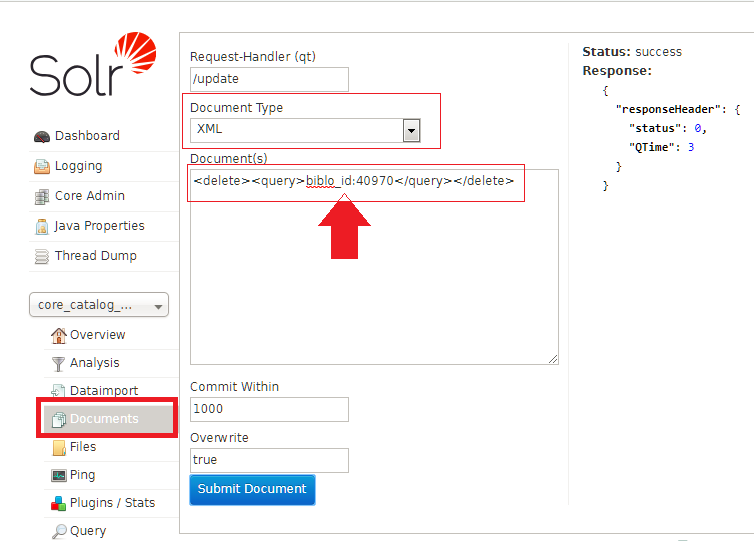
delete Solr Record

<delete><query>*:*</query></delete>

Thursday, May 3, 2018

Install Solr and upgrade old Solr version

Step 1. First, Install Java.
Because solr are Java based softwares we need the Java environment (As it is advised in the Solr wiki : prefere a full JDK to a simple JRE.)
sudo add-apt-repository ppa:webupd8team/java
sudo apt-get update
sudo apt-get install oracle-java8-installer
sudo apt-get install oracle-java8-set-default
Step 3 – Setup JAVA_HOME and JRE_HOME Variable
nano /etc/environment
add two new lines

JAVA_HOME=/usr/lib/jvm/java-8-oracle
JRE_HOME=/usr/lib/jvm/java-8-oracle/jre

reboot then

to validate run  echo $JAVA_HOME


Install Default Solr version 


sudo add-apt-repository universe

Option 1: Install Solr with Tomcat
sudo apt-get install solr-tomcat
Option 2: Install Solr with Jetty
sudo apt-get install solr-jetty
Open the URL http://localhost:8080/solr/admin/, if your tomcat is listen on port 8080.

Notes 
if you get error during installation
tomcat7[4983]:  * no JDK or JRE found - please set JAVA_HOME

then do the next steps

nano  /etc/default/tomcat7
add this line
JAVA_HOME=/usr/lib/jvm/java-8-oracle

change default tomcat port using the next command
nano /etc/tomcat7/server.xml
  • Search "Connector port" and replace 8080 with any new port

Uninstall
sudo apt-get remove solr-tomcat
sudo apt-get remove solr-jetty 
sudo apt-get remove tomcat7-common
sudo apt autoremove


Install Specific version of Solr

1) Install Java
2) Get the URL from       http://archive.apache.org/dist/lucene/solr/
3) Run the next commands

For Solr version 7.3.0

steps: download the package then extract one file from compressed package then call this file and pass compressed folder as prameter

cd ~
wget http://www-eu.apache.org/dist/lucene/solr/7.3.0/solr-7.3.0.tgz
tar xzf solr-7.3.0.tgz solr-7.3.0/bin/install_solr_service.sh --strip-components=2
sudo bash ./install_solr_service.sh  solr-7.3.0.tgz

For Solr version 5.3.1

cd ~
wget http://archive.apache.org/dist/lucene/solr/5.3.1/solr-5.3.1.tgz
tar xzf solr-5.3.1.tgz solr-5.3.1/bin/install_solr_service.sh --strip-components=2
sudo chmod +x install_solr_service.sh
sudo ./install_solr_service.sh solr-5.3.1.tgz

OR


For Solr version 4.10.4

wget https://archive.apache.org/dist/lucene/solr/4.10.4/solr-4.10.4.tgz
tar -xvf solr-4.10.4.tgz
cp -R solr-4.10.4/example /opt/solr
cd /opt/solr
java -jar start.jar

Solr will be active in the next URL   Open the URL http://your_server_ip:8983/solr


Uninstall via
sudo service solr stop
sudo rm -r /var/solr
sudo rm -r /opt/solr-5.3.1
sudo rm -r /opt/solr
sudo rm /etc/init.d/solr
sudo deluser --remove-home solr
sudo deluser --group solr

Use following commands to Start, Stop and check the status of Solr service.
sudo service solr stop
sudo service solr start
sudo service solr status

Create First Solr Collection
sudo su - solr -c "/opt/solr/bin/solr create -c TestCollection1 -n data_driven_schema_configs"
  
this will create new folder with name TestCollection1  in the path /var/solr/data


For more information check https://www.howtoforge.com/tutorial/how-to-install-and-configure-solr-on-ubuntu-1604/


Upgrade old Solr version

use the next script     https://github.com/cominvent/solr-tools/tree/master/upgradeindex

Usage:

Script to Upgrade old indices from 3.x -> 4.x -> 5.x -> 6.x format, 
so it can be used with Solr 6.x or 7.x
Usage: ./upgradeindex.sh [-s] [-t target-ver] <indexdata-root>

Example: ./upgradeindex.sh -s -t 6 /opt/solr

Solr upgradeindex
https://github.com/cradules/bash_scripts/tree/master/solr-tools/upgradeindex
https://github.com/cominvent/solr-tools/tree/master/upgradeindex


Importing/Indexing database (MySQL or SQL Server) in Solr using Data Import Handler
https://gist.github.com/maxivak/3e3ee1fca32f3949f052